For the Coinkite BLOCKCLOCK mini
Keep it ticking.
Your BLOCKCLOCK mini gets everything it shows from its maker's servers. Point it at BTClock's and it keeps running on live Bitcoin data. No firmware change, no account, about two minutes.
bc.btclock.dev
Three steps.
All in the clock's own web page. Nothing to install.
-
Open the clock's web page.
Type the clock's IP address into a browser on the same network. Your router's list of connected devices shows it. If you set a system password, your browser asks for it; any username works.
-
Set the data backend.
Go to Preferences and scroll to External URL's. In Data Backend, replace the address with
bc.btclock.dev, then press Enter or click outside the field. It saves right away and the clock reconnects on its own. No port needed: the clock uses 21021, as it always did.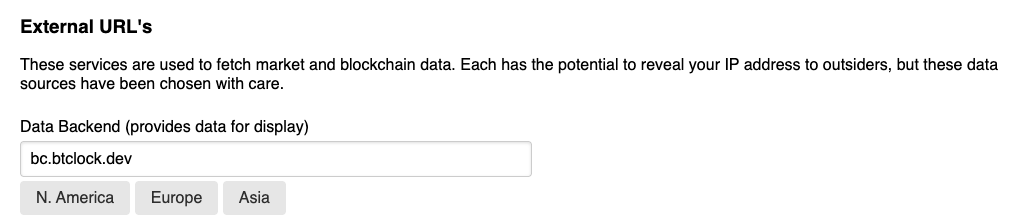
Preferences → External URL's → Data Backend -
Pick what it shows.
On the Display page, choose a group under Popular Groups, select values in Available Values and press Add. The clock steps through Values to be Displayed, in that order. Click one to show it now.
Values you already had keep working. Exchange tickers such as
kraken.BTC-EUR.last_tradenow show BTClock's price for that currency.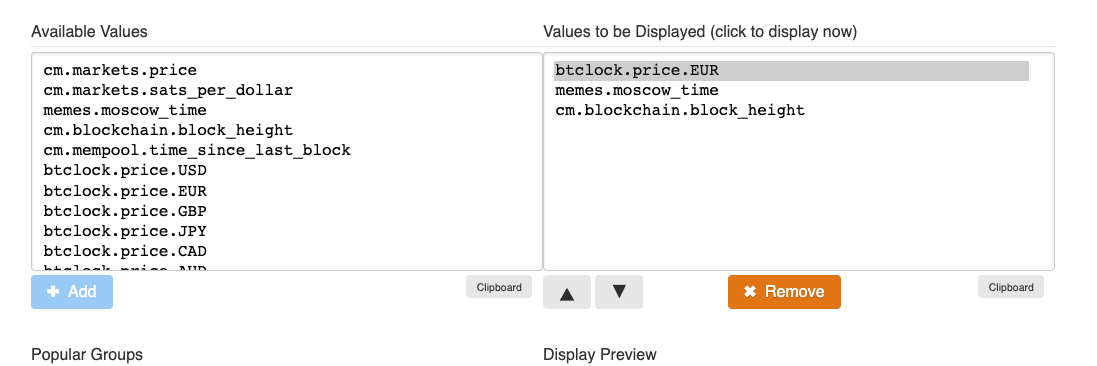
Display → Available Values → Add
What it shows.
The same live data a BTClock runs on, laid out for your seven panels.
- Price
- Bitcoin in dollars, euros, pounds, yen and 150+ more currencies (
btclock.price.EUR), from BTClock's own price feed: the median of several sources. - Sats
- Sats per dollar, Moscow time, and sats per unit of any currency (
btclock.sats.JPY). - Blocks
- Block height, time since the last block, blocks to the next difficulty adjustment and halving, supply and block subsidy.
- Fees
- The median fee for the next block, and what it takes to confirm now, within an hour, a day or a week.
- Time
- Today's date, two rows of world clocks, and Bitcoin's anniversaries with a countdown to the next one. In your own timezone.
- Debt
- Live national debt counters for the United States and the European Union.
- New block
- Set Screen Update Rate to Bitcoin Block and the clock refreshes the moment a block is found.
- Not here
- BitcoinTreasuries holdings, ETH and XRP, and some Clark Moody statistics have no source here. Those show dashes.
Going back.
Click N. America, Europe or Asia under Data Backend to return to Coinkite's own servers, for as long as they run.
Privacy.
As with the original servers, your clock talks to bc.btclock.dev over plain TCP. The server sees your IP address and which values your clock asks for, and keeps them only in rotating server logs. No accounts, no tracking, nothing on this page loads from elsewhere.